For teams About 10 to 100 people

AI your firm can answer for.

Your people have client work and a chat window, and someone has to decide whether the two can meet. Captain runs on your server, keeps people apart, and shows you what every agent really did.

No per-seat fee · MIT licensed · any model, or fully local

deck.example.com · Admin console
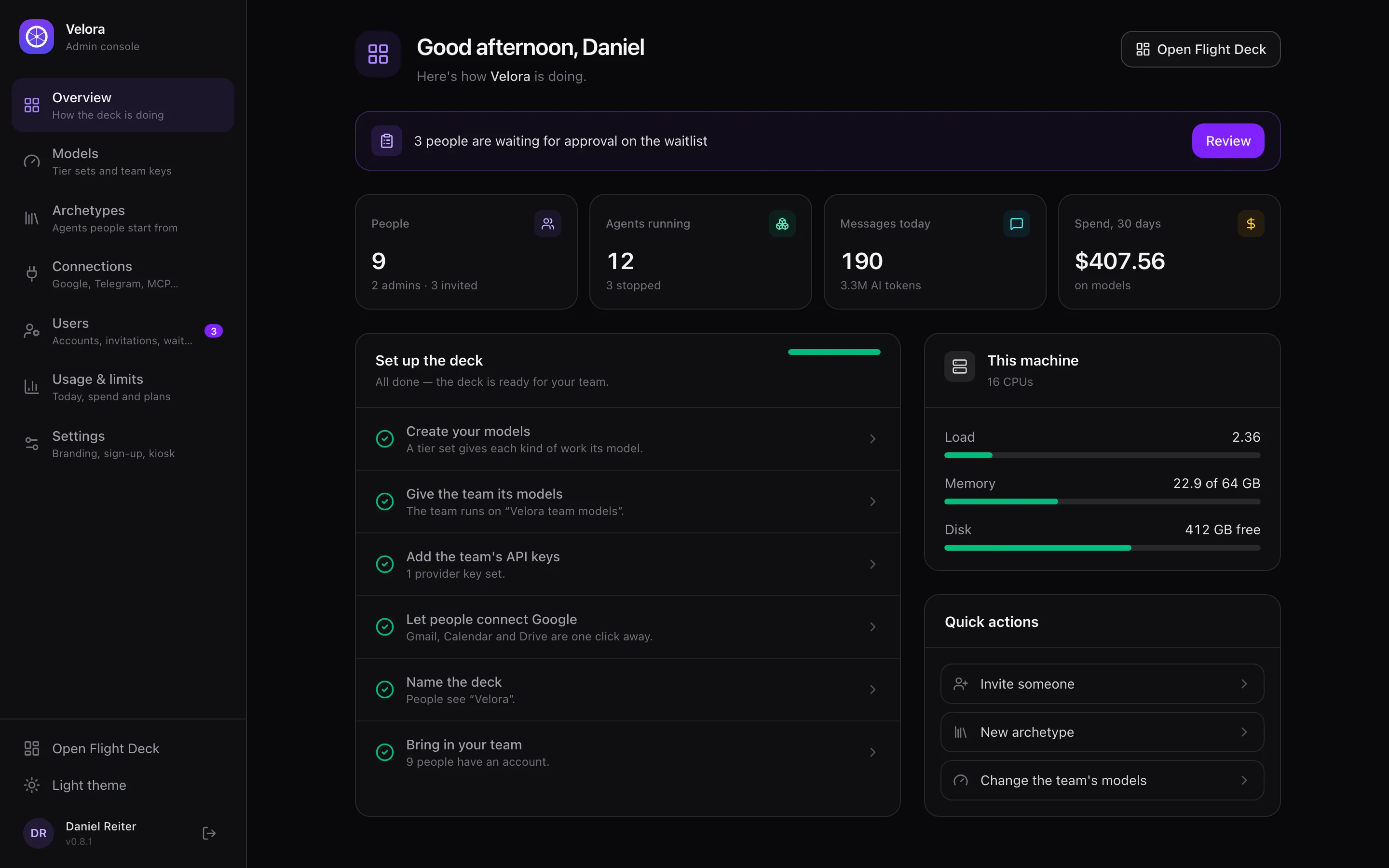
The admin console for a firm called Velora: people, agents running, messages today, 30-day spend, a setup checklist and the machine's load
The admin console, with your firm's name and logo. Made-up data.

The questions you'll be asked.

By your partners, your clients, and whoever signs off on this. Here are the answers, including the awkward ones.

Where does client data go?
Captain runs on your own server and sends nothing to us. Prompts go to the model provider you choose, and with a local model they stay on your hardware. Where data goes
Can staff see each other's work?
Each person signs in to their own agents, files, board and Google or Microsoft account. An agent only ever gets its owner's token. Admins never see a member's tasks, and when an admin manages someone's agent, that's logged. How people stay apart
What if an agent makes something up?
A claimed send or calendar change with no tool call behind it is rejected. When you hand a task over, the board checks the record, your Gmail and your Google Calendar, and in doubt the task stays open. The guards
Can it email a client on its own?
Not by default. Gmail sending stays off until a person turns it on, then it's held to a recipient allowlist and a daily limit. Outlook mail only ever drafts. Auto-replies on narrow topics are a separate opt-in. Mail
How do we know what it did on its own?
Everything an agent did without being asked in a chat (a scheduled report, a hand-over, a run that failed, a proposal) lands on its owner's Line. The bell keeps only what needs a person, and nothing waiting for you is ever dropped. The Line
Does a client's portal page or a PDF leave the building?
Only to your own deck, and from there to the model your agent uses, and only when someone sends it. Captain for Chrome reads the page in that person's browser and Captain for Mac reads the window on their screen; both go to that person's own agent, and a page's text is never treated as their instructions. Captain for Chrome · Captain for Mac
Can agents hand work to each other?
Yes, and every hand-over is its own Taskboard task, with the answer going back to the agent that asked. The turn's mail permissions travel with the work, read by code, so authority never grows along the way. Mail meant for an agent becomes its task, and every agent gets the goals on your Course; a goal is never permission to do anything. Agents as colleagues
Who did what, and when?
Every tool call goes into an append-only, tamper-evident register. Each person reads their own Activity, and admins read Audit. The register
Does it understand our material?
Exam it and find out. Captain writes 10 to 120 questions from your documents, asks them through the agent's real chat, scores each document, and shows if it's better or worse than last time. Onboarding
What does it cost per person?
There's no seat fee, because the software is MIT licensed. You pay for a server and for model use, and you set how many messages and tokens each plan gets per day. Plans and limits
What doesn't it protect against?
It's containment, not an OS sandbox. An admin's agent still has a shell that reaches the whole host, and anyone you approve for Crew gets coding workers with that same reach, so treat both accordingly. Custom tools, which stay off until an admin turns them on, run in a Landlock sandbox on Linux, but not on macOS, Windows or a stock Raspberry Pi 5. The team checklist
Is anyone actually using it?
Admin console → Activity shows a bar per day for what each person typed on any channel (their agents' own work never counts), who has gone quiet and who never started, and whether you've written to them. Write from your own Gmail or Outlook, or Mark as written after a call. Activity
Who keeps it up to date?
An admin, from the console. Captain tries the new version on a spare port, warns everyone with a two-minute countdown, stops the agents, updates, and goes back by itself if it doesn't come up. Every admin gets an email. You can leave it off, ask it to tell you, or let it install by itself. Updates
Who's behind it?
One maintainer, Stevica Kuharski, for now. The code is open and runs on your server, so it keeps running whatever happens to the project. Read the code

Good first jobs.

Start with one repeated job where you can check the result yourself.

A sensible first rollout.

  1. 1

    Put it behind your domain

    Install it on a server with sign-in on. Registration closes after the first admin.

  2. 2

    Set models and limits

    Publish a team set of models with team keys, which members can't read, and choose daily limits per plan.

  3. 3

    Train one agent on one job

    Give it the documents, review its lessons, exam it, and practise on real tasks. Nothing is sent or kept while it practises.

  4. 4

    Invite people

    Invite them by email from your own Gmail or Outlook. They pick a password, and you decide who gets the kiosk.

On your server
pip install captain-claw
FD_AUTH_ENABLED=true FD_PUBLIC_URL=https://deck.example.com flight-deck

The full team guide, with the checklist to read before anyone else logs in.

Prefer to watch? The Captain admin tutorial walks through running a deck for your team.

Try it on real work.

Join the waitlist for Cohort 001, our first early-access group, and you'll get an email when you're in. Or run Captain on your own machine today.