Captain: self-hosted AI agents your team can check

True story It told us “Sent” six times in a row. No email went out.

Your AI said it emailed the client. It didn’t.

Captain catches that. If the work can’t be proven, the task stays open with you.

Sound familiar? “Is that even in our policy?”

Your AI quoted your own handbook. It got it wrong.

Exam it first. Captain tests an agent on your own documents and shows why a wrong answer went wrong.

Sound familiar? “Did you paste that into ChatGPT?”

Your client’s contract is now in someone’s personal ChatGPT.

Give them somewhere better. Agents on your own server, with each person’s own sign-in and a record of every tool call.

Sound familiar? “Why did they get this twice?”

Your AI was about to email the client. Again.

Captain refuses the repeat. Before it writes, it looks through Drafts and recent Sent mail, in Gmail and Outlook.

True story About forty “Re: …” drafts in three days. We hadn’t asked for one.

Your AI drafted forty replies. Nobody asked.

Now it has to ask. Work running on its own can only propose an email, and nothing is created until you approve.

Sound familiar? “Who did that, and when?”

Your AI says it worked all night. Did it?

Read what really ran. Every tool call goes on a tamper-evident record, so the answer comes from what ran, not from memory.

Self-hosted AI agents for firms that run on documents and client email. No per-seat fee, MIT licensed, any model or fully local.

What the agent told you

Policy Analyst

Done. The claim qualifies under section 4.2 of the Returns Policy, and I emailed Lena to confirm a credit of EUR 1,176.

What really happened Not proven

It says it sent the email, but only a draft was made.

  • Email to Lena Email sending is off for your account
  • Draft to Lena Recorded by the tool
An illustration with made-up data. See the Taskboard

What the agent told you

Policy Analyst, on a 15:40 arrival on a Friday

Yes, it can still be taken in. The Graz depot accepts inbound loads until 16:00, so a 15:40 arrival is fine.

What its documents say Wrong

On Fridays the Graz depot closes inbound at 15:00.

  • Open until 16:00 on Fridays Its documents say otherwise
  • Why it went wrong It stopped at the weekday hours in section 7.1
An illustration with made-up data. See Onboarding

What happens today

A colleague

I just pasted the whole contract in. It’s so much faster.

What you give them instead On your server

Agents your firm runs itself, one sign-in per person.

  • Prompts Go only to the model you pick, or stay on your hardware
  • Every tool call On a tamper-evident record
An illustration with made-up data. See Team & security

What the agent was about to do

Inbox Assistant

Sending Tomas the Q4 quote now.

What really happened Refused

Not created: it’s a repeat of an email you already sent.

  • Second email to Tomas Same recipient, same subject
  • Another copy Only if you ask for one
An illustration with made-up data. See Mail & channels

What the agent used to do

Autonomous Work

A customer is waiting for a reply, so I drafted one.

What happens now Waits for you

It tells you who’s waiting, and writes nothing until you say so.

  • Drafts nobody asked for Autonomous Work can’t make them
  • A scheduled job Writes mail only if its own text asks
An illustration with made-up data. See the guards

What the agent told you

Inbox Assistant

All done overnight. I filed the invoices and updated the tracker.

What the record says On record

The invoices were filed. The tracker update failed at 02:14.

  • Updating the tracker 02:14, error
  • Filing the invoices 02:16, ok
An illustration with made-up data. See the record

Hire it like a person. Check it like one.

Teach it your work, then exam it

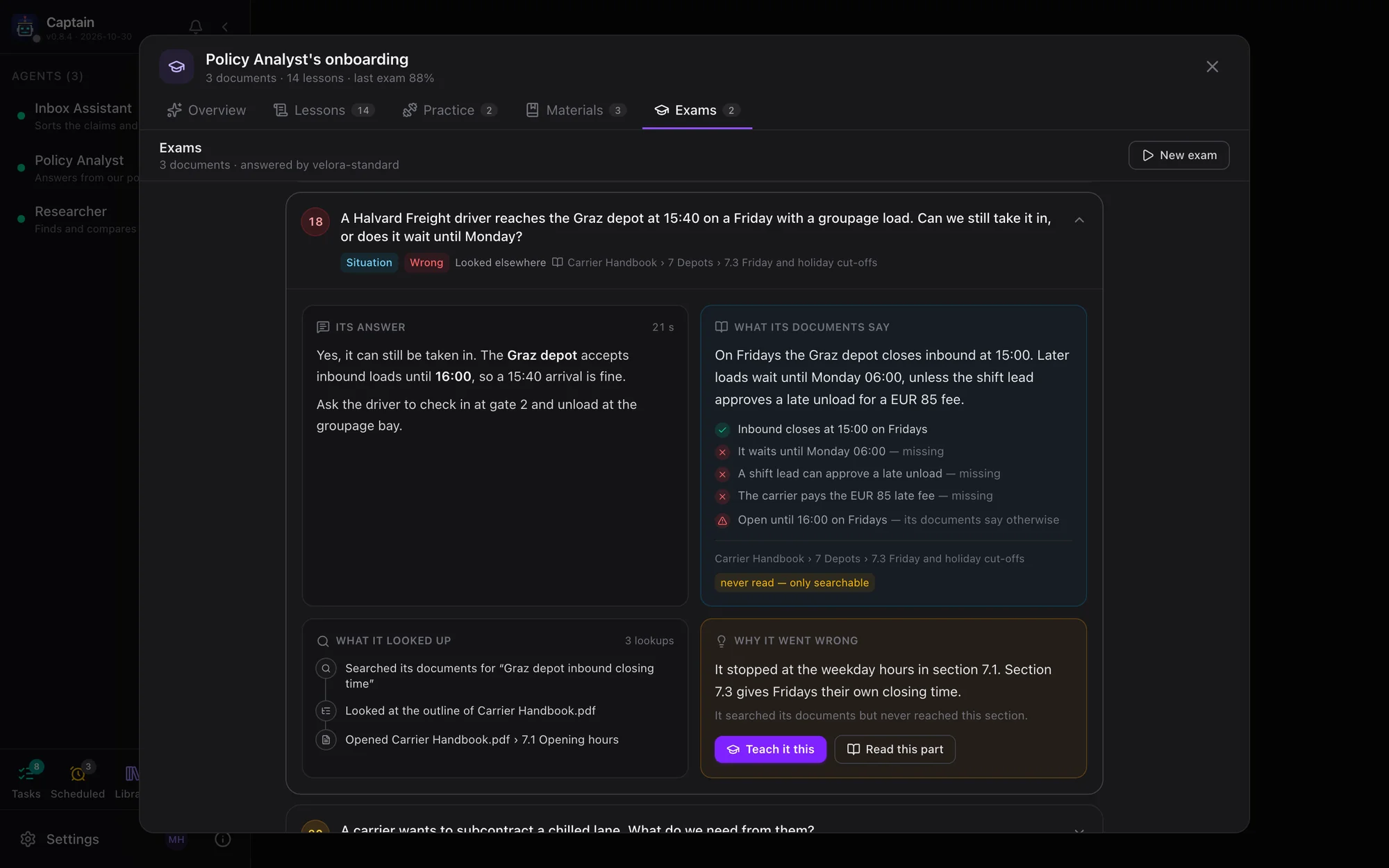
Give it up to 12 documents and your instructions, and review the rules and facts it draws out. An exam of 10 to 120 questions then goes through its real chat, grades each answer and says why a wrong one went wrong.

See Onboarding →
deck.example.com · Onboarding
One exam question opened: the agent's wrong answer, what its documents say point by point, and why it went wrong, with buttons to teach it or read that part

See everything it was asked

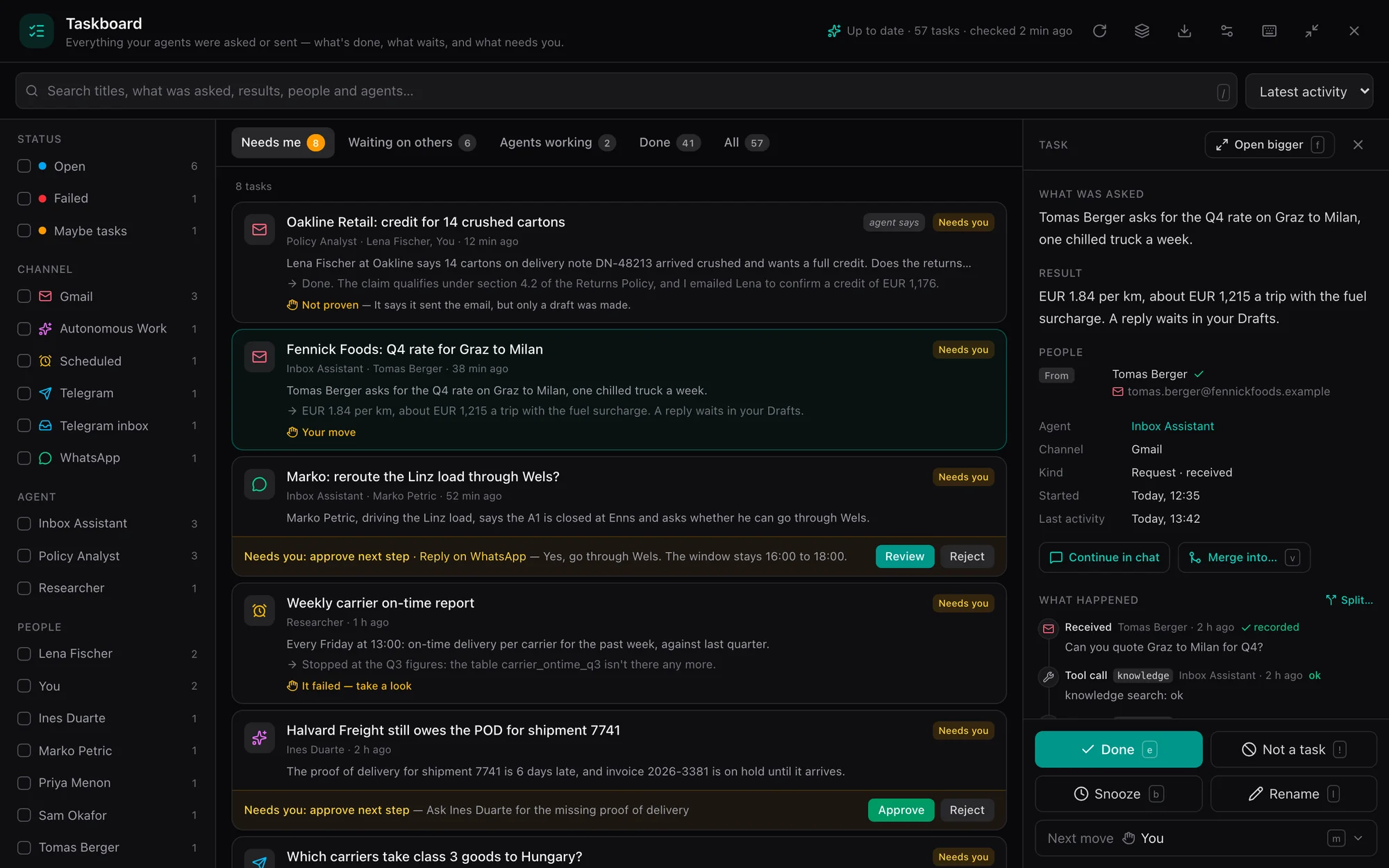
Email, WhatsApp, Telegram and scheduled jobs land on one board: Needs me, Waiting on others, Agents working, Done. Next steps wait for your approval, and email only ever becomes a draft. Tick several and hand them over with one instruction.

See the Taskboard →
deck.example.com · Taskboard
The Taskboard on Needs me: tasks from email, WhatsApp, a scheduled job and Telegram, with one quote request open in the side panel

Give your staff a front door

A kiosk with skill cards that start real work, a library of every file the agents made, and schedules that deliver to their inbox. Each person connects their own Google or Microsoft account.

See the Kiosk →
deck.example.com
The kiosk: an agent greets Maya with skill cards, beside Scheduled, Library and Data tiles
The kiosk on a phone

Not sure who to hire? Say what you need

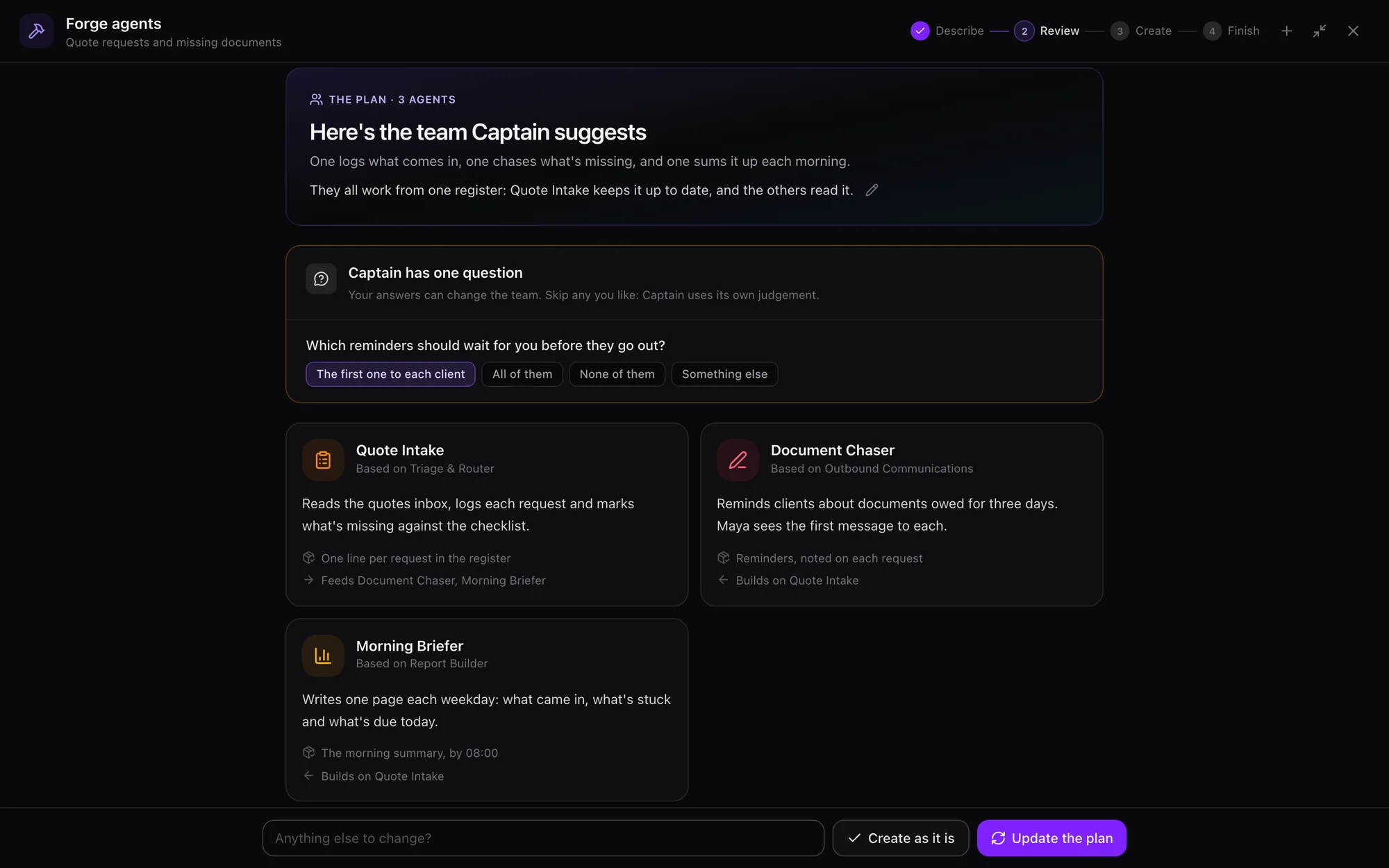
Describe the job in your own words and attach your files. Captain plans a small team of standing agents and you approve it. It then recommends what should run on a schedule and what software is worth building, and coding agents build that on your server, for a person to land.

See Forge agents → See Crew →
deck.example.com · Forge agents
Forge agents, review: the agents Captain proposes with their jobs, and its questions for the person

Know what it did while you weren't looking

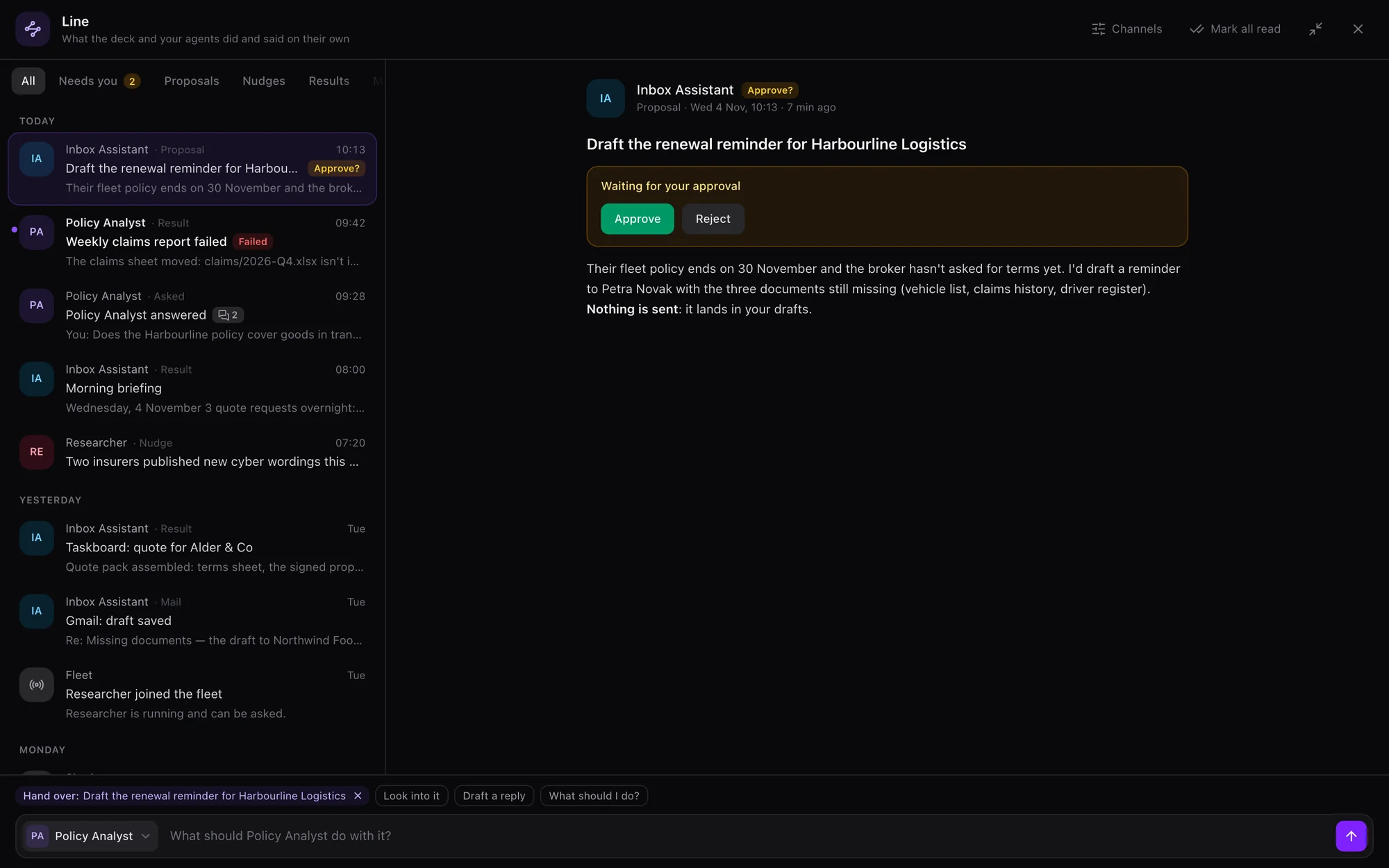
Scheduled tasks, work it did on its own, finished runs and proposals land on one Line per person. The bell keeps only what needs you, with Approve and Reject right there. Ask an agent about any item, or hand it over.

See the Line →
deck.example.com · Line
The Line: a proposal waiting for approval, a failed scheduled report, an answered question and the morning briefing, with the proposal open beside the list

New in 0.9.0 Custom tools · Agent files · Agents as colleagues

Agents that work like a team.

Tools built for the job your firm actually does. Agents you can back up, move or hand to a client in one file. And agents that pass work to each other, pick up email meant for them and work toward the goals you set.

Custom tools

Describe a tool your agents need. Crew's coding agents write it with its tests, it goes live only when they pass, and Flight Deck runs every call as the person, with their own secrets. Off until an admin turns it on, and sandboxed on Linux.

See Custom tools →

Agent files

An agent in one .captain file: a Template, Trained, or a Full backup. Bring it in with Undo, schedule backups, and update a client's copy later without touching what it learned there. Keys never travel unless sealed.

See Agent files →

Agents as colleagues

Hand-overs that land on the Taskboard, mail meant for an agent that becomes its task, any IMAP inbox, lessons from your corrections that wait for your yes, and a Course of goals in every agent's prompt.

See Agents as colleagues →

Also new: ask_user asks you in a Flight Deck dialog, External memory shares one memory across a person's agents, image_manipulation edits pictures with no scripts, and Console → Activity shows who's using the deck. 79 built-in tools per agent. · What's new in 0.9.0

Built after things went wrong.

An agent really did this to us: six send requests in a row answered “Sent”, no tool call behind any of them, and four replies quoting Message IDs it made up. Now every final reply is judged, and a claimed send with nothing behind it is rejected. Captain's guards exist because of incidents like that one.

It's containment, not an OS sandbox, and the security page says plainly what that means.

Since 0.8.8 Captain for Chrome · Captain for Mac

Ask from where you work.

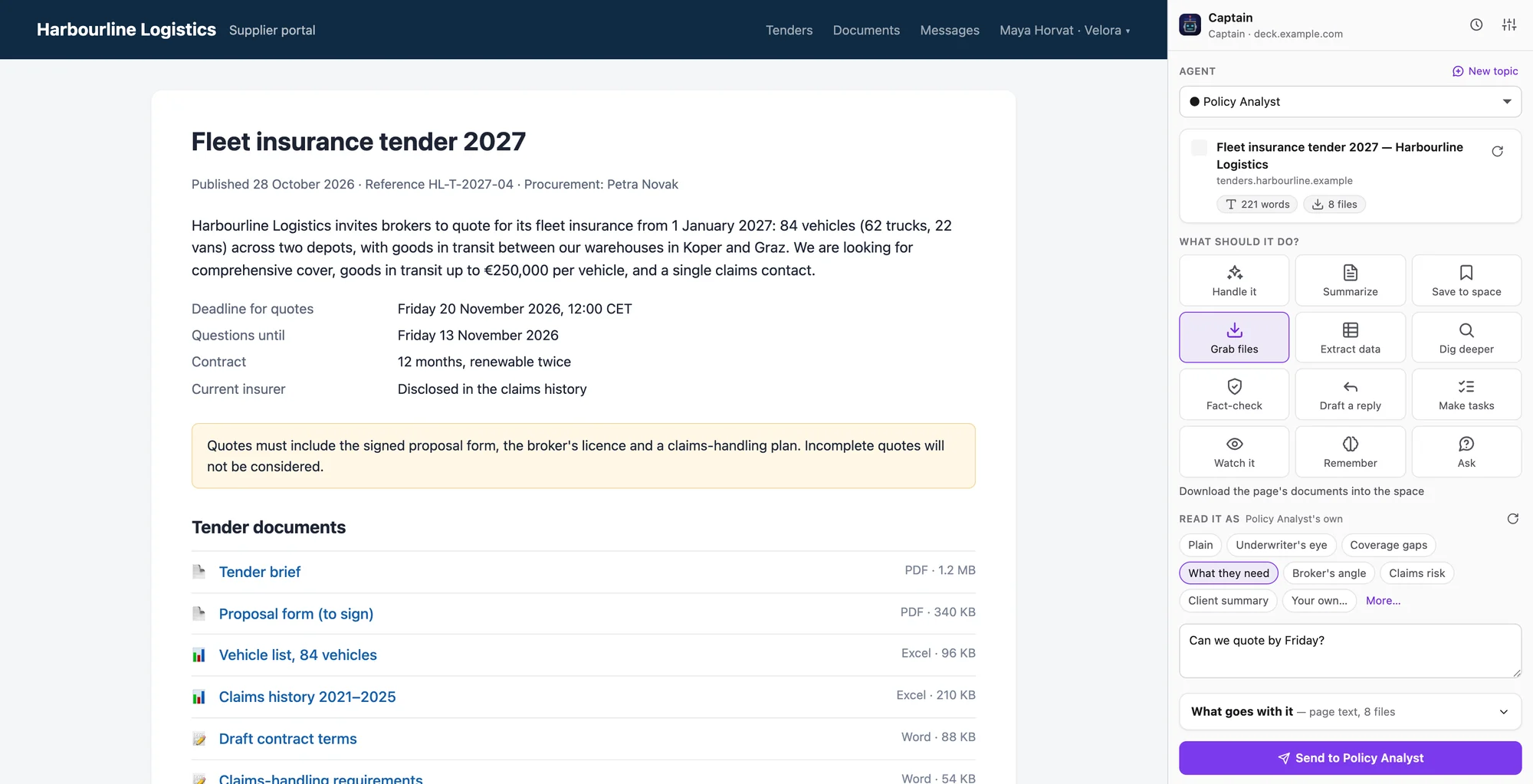
People don't work in a chat window. They work in a client's portal, their mail and a PDF of the policy. Send what you're looking at to the agent that knows the work, and get the answer back where you are.

Captain for Chrome
A tender page with its documents, and Captain's side panel sending it to the Policy Analyst with Grab files

The page you're on, signed in

The extension reads the page in your own browser and fetches the files it links to with your session. Summarize it, grab its files, pull out its data, draft your reply, or watch it for changes.

See Captain for Chrome →
Mail
10:20
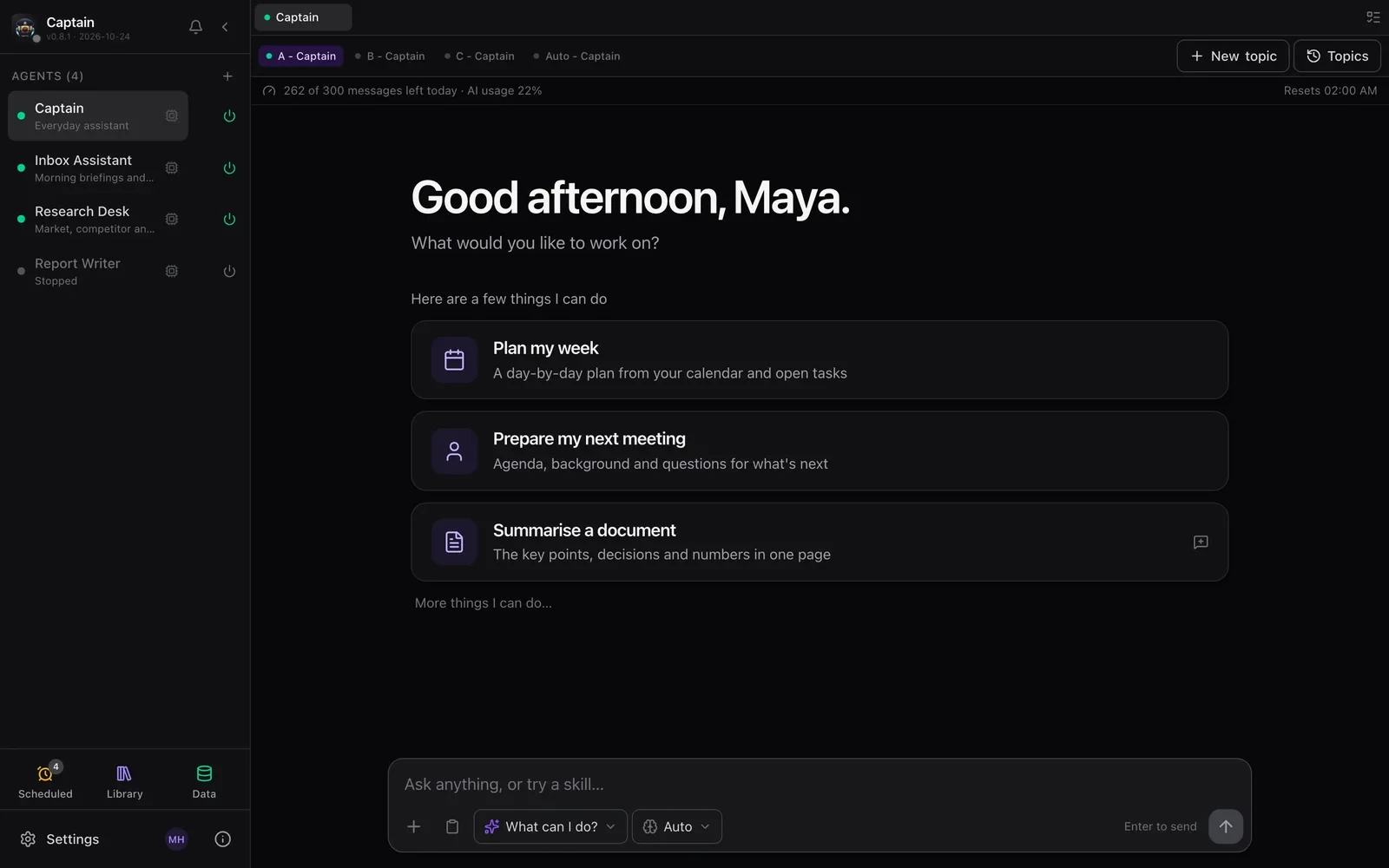
Captain's panel over Mail, with the selection, screen text and pointer chips and a typed task

Any app on your Mac: hold fn

Captain reads the window, takes your selection as what you mean, and sends it with what you type or say. The draft comes back in a panel, and Paste into Mail puts it in your reply.

See Captain for Mac →

Running a firm?

Someone has to decide whether AI can touch client work. See the questions you'll be asked and how Captain answers them. There's no per-seat fee: one server, your AI keys, and daily limits per person.

Captain for teams

Running your own hardware?

A crew of agents on a Mac, a Raspberry Pi or a VPS. Small models that do real work, fully local if you like, and a watch you can flash yourself to talk to them.

Self-host Captain

Just you? Download the desktop app for Mac or Windows.

What else is inside.

Read the code. Try it on real work.

Captain is MIT licensed and built in daily use by its maintainer. Cohort 001 is our first early-access group: real work, honest feedback, and features that change week to week.

Or run it now
pip install captain-claw
flight-deck

Python 3.11 or newer. · Install guide · Watch the complete guide · Follow releases